This article is related to a personal project, from which some snippets in this article may be found.
DICOM Transfer Protocols Analysis
This blog is an excerpt from one of my course design reports.
1. Overview
Introduction to PACS
Image Archiving and Communication System (PACS) is a medical imaging technology that provides functions such as storage, access, and search of images of multiple modalities. The common format for PACS image storage and transmission is DICOM, and PACS itself is part of the DICOM standard. The PACS system consists of Modality, Server and View Station, which can be considered as an implementation of the client/service model. The modal and the viewer belong to the user (Service Class User, SCU), and the server is called the Service Class Provider, abbreviated as SCP.
In implementation, modalities are typically digital imaging devices such as computed tomography (CT), ultrasound, nuclear medicine, positron emission tomography (PET), and magnetic resonance imaging (MRI). The modality can be sent to a quality assurance (QA) workstation first, and if the information is correct, the image will be passed to the server for storage. This step comes from the C-STORE protocol in the DICOM standard. View Station is a place where radiologists review patient research and formulate diagnoses. Its basic function is to perform addition, deletion, and modification operations on the data in the server, which is implemented by C-FIND, C-MOVE, and C-GET in the DICOM standard. In View Station, peripheral facilities such as reporting systems can also be inherited, and integrated with other information systems in the hospital, such as the electronic medical record system EMR, to form an end-to-end workflow.
DCMTK
Here we use the DCMTK toolkit as Modality and View Station. DCMTK is a set of open source packages and libraries that implement the DCM standard. It is developed using C++ and is cross-platform. Most of the DICOM standard is implemented in DCMTK, including image opening, conversion and verification functions, and the transmission of DICOM files over the Internet.
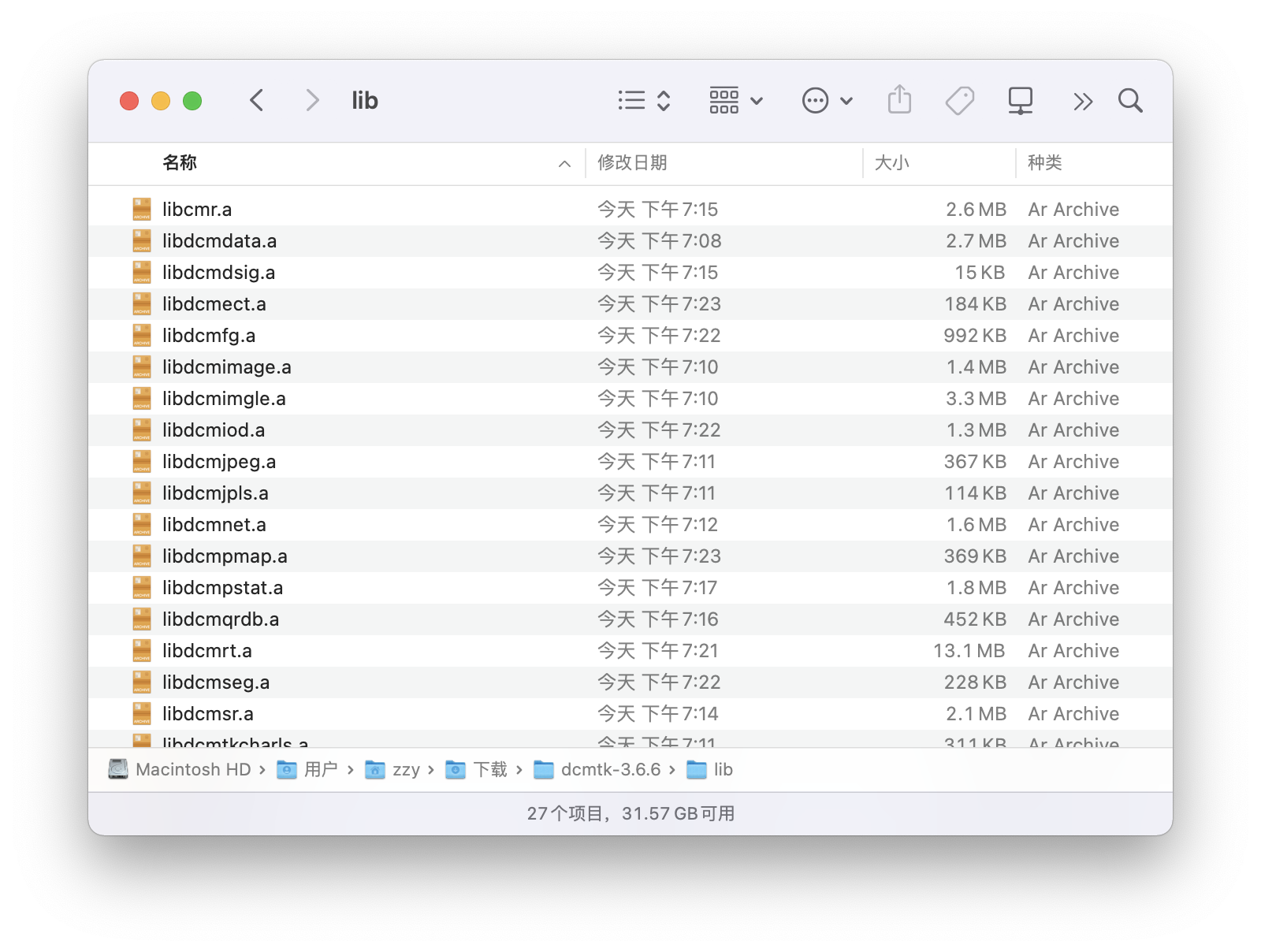
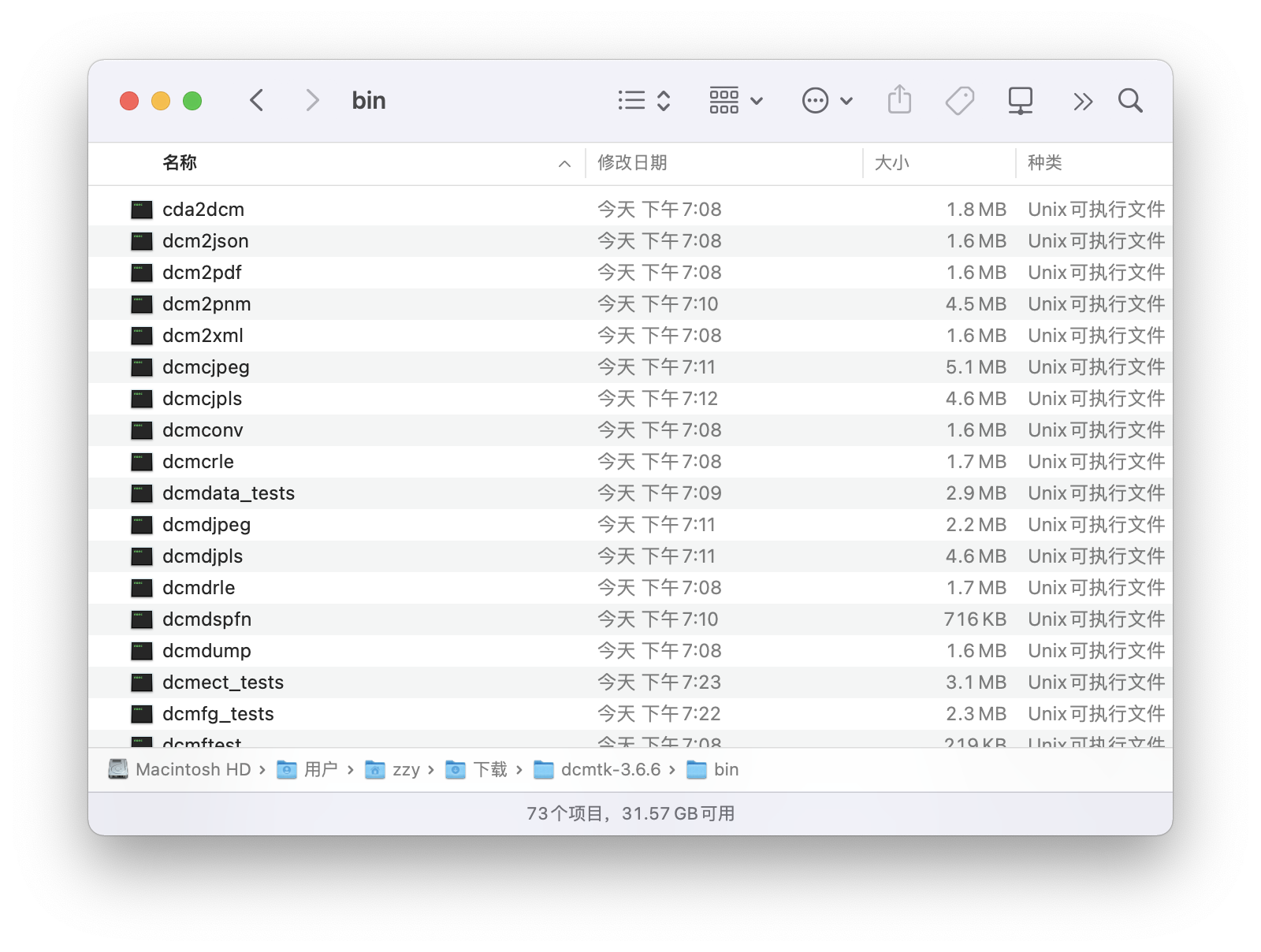
This time, DCMTK is built on the macOS system, and the builds on other UNIX-like systems should also have the same steps. The CMakelist corresponding to various systems has been written in the DCMTK source code, and you only need to execute cmake to complete the configuration. Then make in the source file path can build the entire project. After the build is successful, the corresponding static library files and binary executable files will be output:
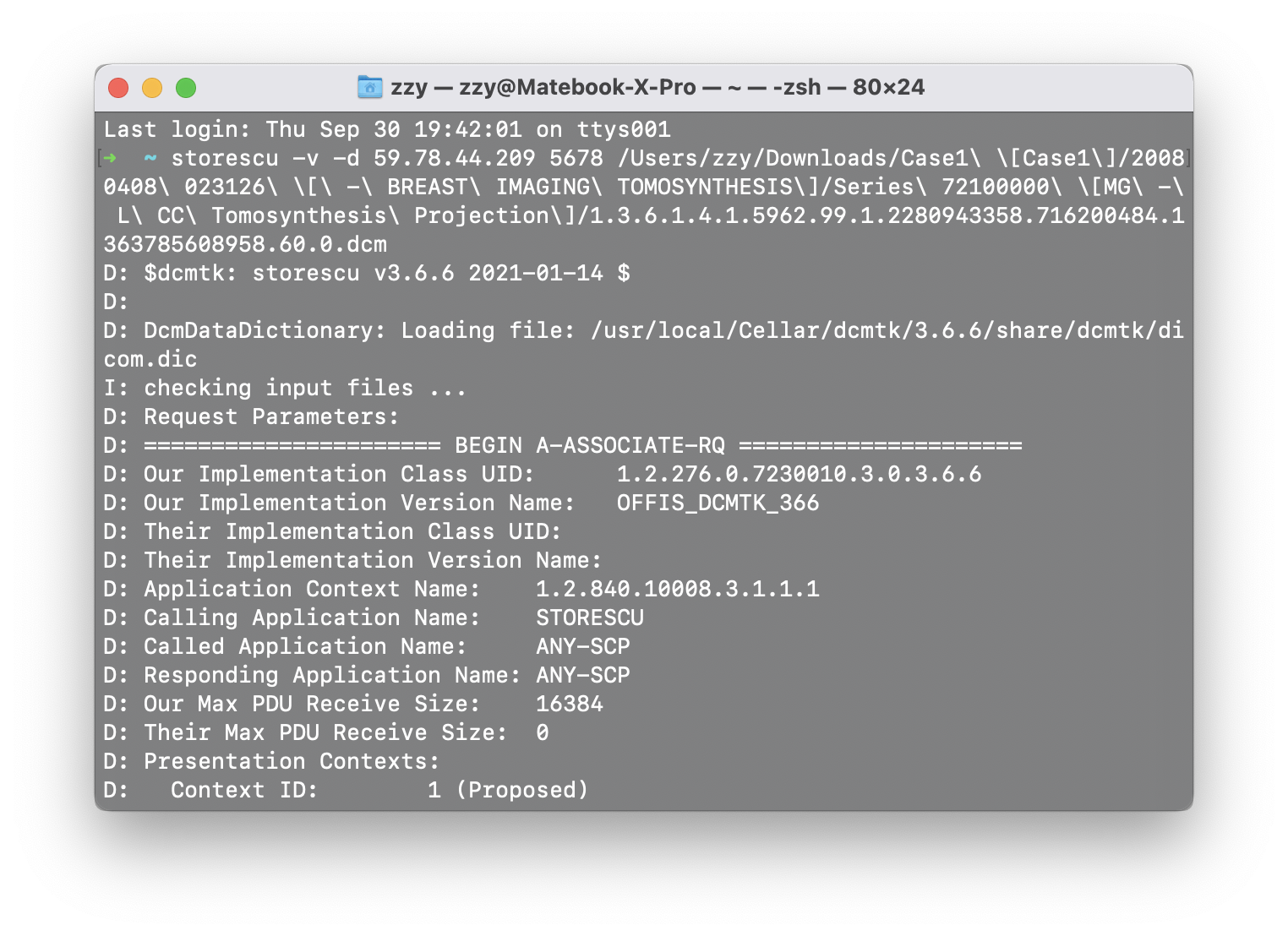
The output has a set of command line tools and the corresponding static link library, which meets the needs of users to call through system commands and direct link calls, which is very convenient for secondary development. At the same time, we can also directly use the generated command line tools to perform various DICOM operations. For example, we can use the storescu as modality to send DICOM files to the server. The format sent is
1
storescu [options] peer port dcmfile-in...
CONQEST SERVER
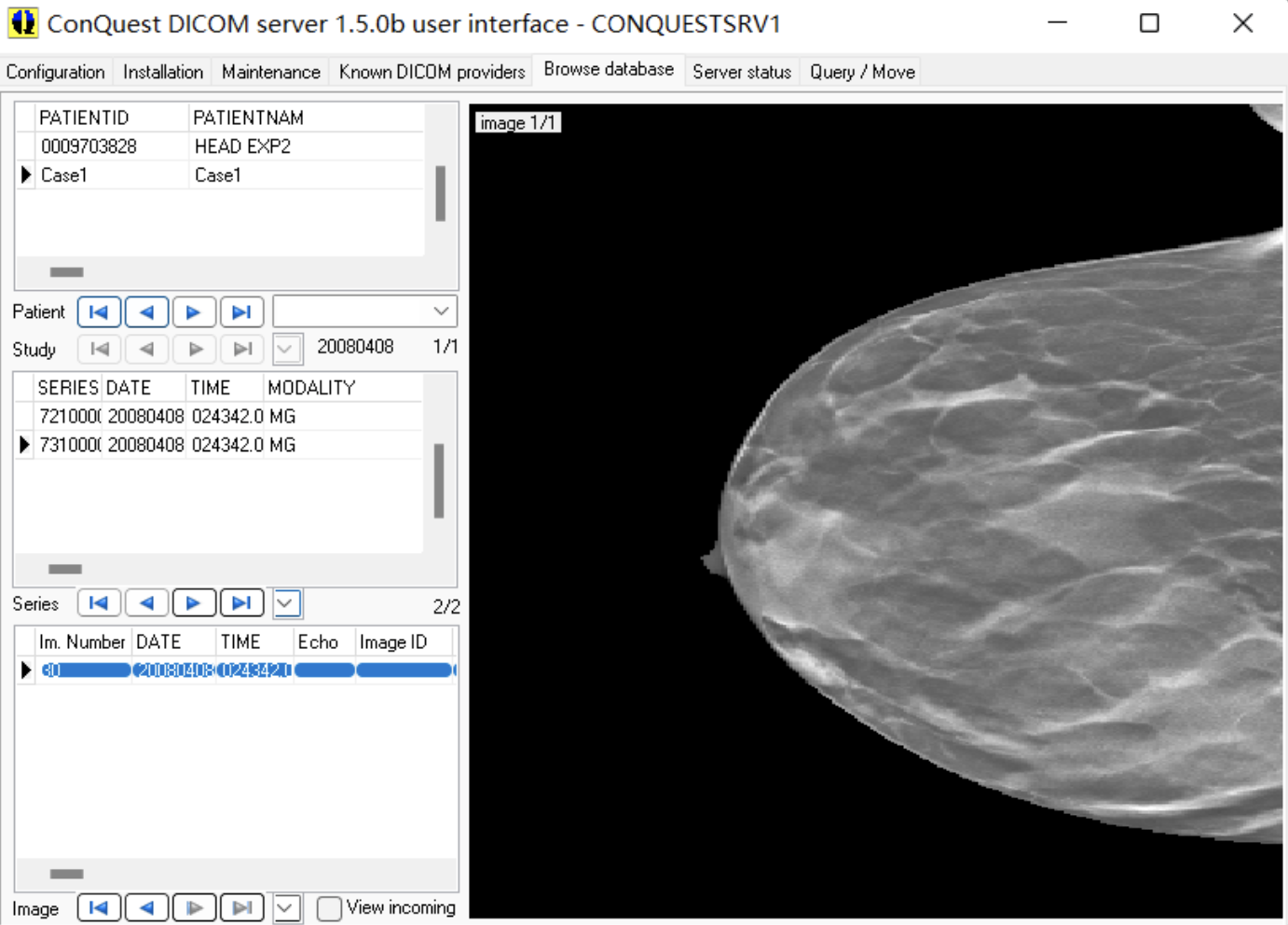
CONQUEST is a lightweight DICOM SERVER that implements the DIMSE message mechanism and supports multiple databases.
2. Image communication and its parameter analysis
Overview
DICOM is a high-level protocol built on top of TCP/IP. The bottom layer of the DICOM protocol is ULP (Upper Layer Protocol). It is mainly responsible for connecting with TCP. After the DICOM application entity completes the message exchange through DIMSE, the DICOM upper protocol layer ULP is required to provide transmission support.
ULP provides 7 protocol data units (Protocol Data Unit, PDU) to realize the above-mentioned 5 kinds of services.
A-ASSOCIATE-RQ:
A-ASSOCIATE-AC:
A-ASSOCIATE-RJ:
P-DATA-TF:
A-RELEASE-RQ:
A-RELEASE-RP:
A-ABORT:
The process of DICOM image transmission can also be inferred from the foregoing: the connection is established through the Association PDU, the actual transmission is performed through the P-DATA-TF PDU, and the connection is released through the Release PDU after the transmission is completed, or A-ABORT is used to terminate the connection during transmission.
The details of the communication will be described below.
C-STORE
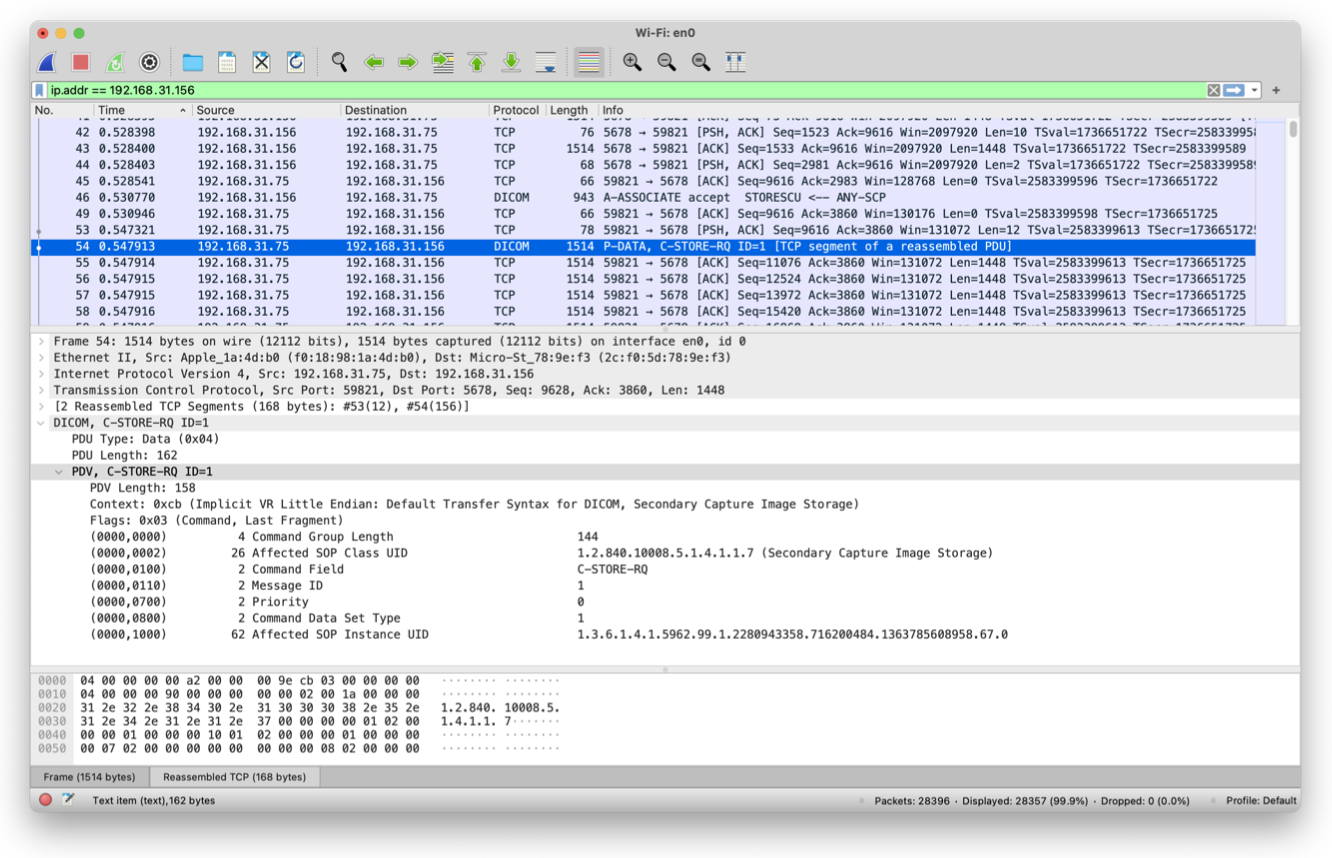
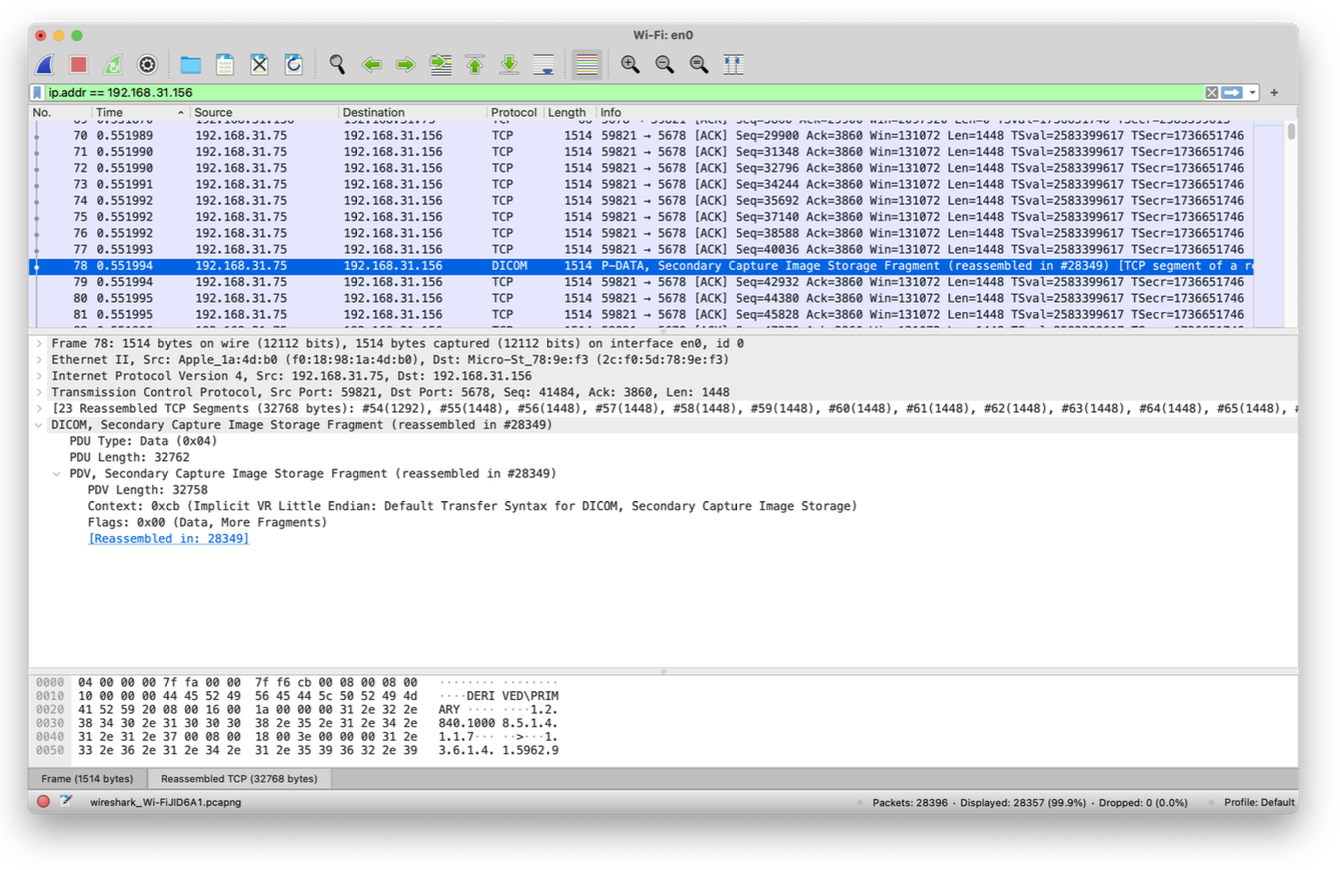
The -v -d parameter is used here to enable the command line tool of DCMTK to output detailed logs in Debug mode, and a network packet capture tool can also be used for auxiliary analysis.
The log includes the detailed process of connection establishment, transmission, and completion of the transmission between the two parties, including the request and response information A-ASSOCIATE-RQ, A-ASSOCIATE-AC, the DIMSE information of the store request and the received information when the connection is established. DIMSE information that the store responds to.
connection establishment
In the DICOM standard, the connection request A-ASSOCIATE-RQ is described as follows:
**PDU
:————:
1
02
3-6
7-8
9-10
11-26
27-42
43-74
75-xxx
6
After the server receives the request, the server will start to parse the information carried in the request, mainly to check the carried Presentation Context, and will respond when the conditions are met, and then return the ASSOCIATE-AC message, whose structure is defined as follows:
**PDU
:————:
1
2
3-6
7-8
9-10
11-26
27-42
43-74
75-xxx
Presentation Context
Presentation Context is a representation in the DICOM protocol that specifies the form of transport supported by the client. It describes in detail the structure and encoding format of the content of this type of fragment. It consists of 3 parts: a Context ID, an Abstract Syntax and multiple Transfer Syntax.
Positive odd numbers between 255
Abstract Syntax is the meaning of data representation, usually represented by DICOM SOP Class UID, such as the following two IDs; at the same time, it can also be represented by private ID to realize the transmission of custom image types.
1.2.840.10008.1.1
1.2.840.10008.5.1.4.1.1
Transfer Syntax is the data encoding format. Usually represented by DICOM Transfer Syntax Class UID, such as the following two IDs; at the same time, it can also be represented by private ID to realize the transfer of custom image types.
1.2.840.10008.1.2
1.2.840.10008.1.2.4.50
The logs of dcmtk can help us to parse the Presentation Context as follows:
The other party will respond and the connection will be established.
Then the DIMSE message is sent at the P-DATA layer. It can be seen that the DIMSE message mainly contains this SOP, which is the Information Model of the StudyRoot query, and also carries two Query.
On the server side, we can check the log to determine the operation mode of the query:
1 2 3 4 5 6 7 8 9 10 11 12 13 14 15 16 17 18 19
[CONQUESTSRV1] UPACS THREAD 46: STARTED AT: Wed Oct 1319:36:592021 [CONQUESTSRV1] A-ASSOCIATE-RQ Packet Dump [CONQUESTSRV1] Calling Application Title : "FINDSCU " [CONQUESTSRV1] Called Application Title : "ANY-SCP " [CONQUESTSRV1] Application Context : "1.2.840.10008.3.1.1.1", PDU length: 16384 [CONQUESTSRV1] Number of Proposed Presentation Contexts: 1 [CONQUESTSRV1] Presentation Context 0"1.2.840.10008.5.1.4.1.2.2.1"1 [CONQUESTSRV1] Server Command := 0020 [CONQUESTSRV1] Message ID := 0001 [CONQUESTSRV1] (StudyRootQuery) search level: STUDY [CONQUESTSRV1] Query On Study [CONQUESTSRV1] Issue Query on Columns: DICOMStudies.PatientID [CONQUESTSRV1] Values: DICOMStudies.PatientID = 'Case1' [CONQUESTSRV1] Tables: DICOMStudies [CONQUESTSRV1] Sorting ((null)) DoSort := 0 [CONQUESTSRV1] Records = 1 [CONQUESTSRV1] C-Find (StudyRoot) located 1 records [CONQUESTSRV1] UPACS THREAD 46: ENDED AT: Wed Oct 1319:36:592021 [CONQUESTSRV1] UPACS THREAD 46: TOTAL RUNNING TIME: 0 SECONDS
It can be seen that the server first determines to start the query from Study as the root node, and then starts the query in the PatientID column just specified, finds a record, and then sends a response. The following is the response content parsed by SCU:
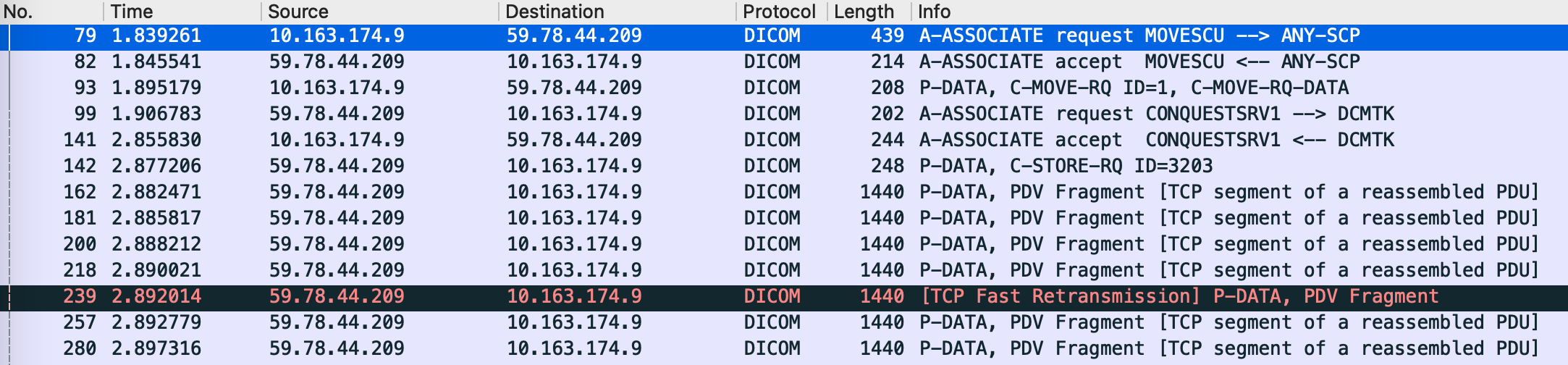
C-MOVE can be understood that after C-FIND query, the SCP of C-MOVE initiates a C-STORE request to the SCU, and finally transmits the image to the SCU of C-MOVE.
From the analysis of the packet capture software, it can be seen that the SCU first transmits C-MOVE DIMSE to the SCP, and the other party sends a connection request in turn after receiving it.
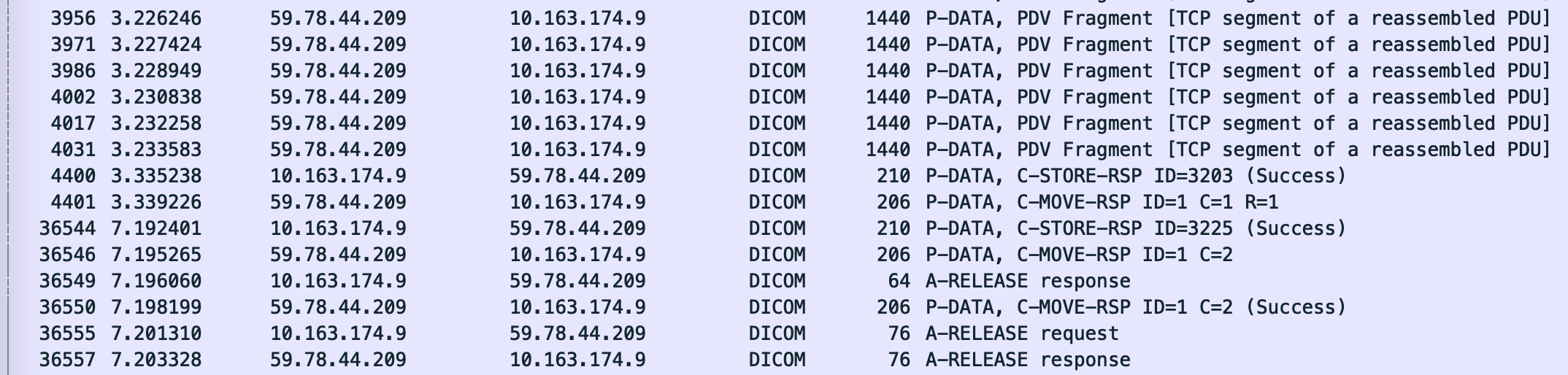
After the C-STORE transmission is completed (the PDU side sends a C-STORE RSP), the other party will send a C-MOVE response. After all sub-C-STORE operations are completed, a total C-STORE response will be sent, and both parties will start Disconnect.
log analysis
The first is that the SCU requests the SCP to establish a connection:
After processing the C-MOVE request on the SCP side, a connection request is initiated to the SCU. This request contains a SecondaryCaptureImageStorage Presentation Context, which is also consistent with the C-MOVE connection request mentioned earlier. You can see that the called application name sent by the other party is the name specified in the -aem parameter.
I: Received Store Request D: ===================== INCOMING DIMSE MESSAGE ==================== D: Message Type : C-STORE RQ D: Presentation Context ID : 119 D: Message ID : 3203 D: Affected SOP Class UID : SecondaryCaptureImageStorage D: Affected SOP Instance UID : 1.3.6.1.4.1.5962.99.1.2280943358.716200484.1363785608958.60.0 D: Data Set : present D: Priority : medium D: Move Originator AE Title : MOVESCU D: Move Originator ID : 1 D: ======================= END DIMSE MESSAGE ======================= D: DcmDataset::read() TransferSyntax="Little Endian Implicit" D: DcmItem::checkAndUpdateVR() setting undefined VR of PixelPaddingValue (0028,0120) to'US' because PixelRepresentation (0028,0103) has a value that is different from 1 D: DcmItem::checkAndUpdateVR() setting undefined VR of PixelPaddingRangeLimit (0028,0121) to'US' because PixelRepresentation (0028,0103) has a value that is different from 1 W: DICOM file already exists, overwriting: SC.1.3.6.1.4.1.5962.99.1.2280943358.716200484.1363785608958.60.0 D: DcmFileFormat::checkMetaHeaderValue() Version of MetaHeader is ok: 0x0001 D: DcmFileFormat::checkMetaHeaderValue() use SOPClassUID [1.2.840.10008.5.1.4.1.1.7] from Dataset D: DcmFileFormat::checkMetaHeaderValue() use SOPInstanceUID [1.3.6.1.4.1.5962.99.1.2280943358.716200484.1363785608958.60.0] from Dataset D: DcmFileFormat::checkMetaHeaderValue() use new TransferSyntaxUID [Little Endian Implicit] on writing following Dataset D: DcmFileFormat::validateMetaInfo() found 7 Elements in DcmMetaInfo 'metinf' D: DcmDataset::read() TransferSyntax="Little Endian Implicit"
After a C-STORE transfer is complete, a C-MOVE response is received, but since there are other transfers in progress, the DIMSE Status is Pending. Then there is the next C-STORE request and the corresponding transmission process and response.
I: Received Move Response 1 D: ===================== INCOMING DIMSE MESSAGE ==================== D: Message Type : C-MOVE RSP D: Message ID Being Responded To : 1 D: Affected SOP Class UID : MOVEPatientRootQueryRetrieveInformationModel D: Remaining Suboperations : 1 D: Completed Suboperations : 1 D: Failed Suboperations : 0 D: Warning Suboperations : 0 D: Data Set : none D: DIMSE Status : 0xff00: Pending: Sub-operations are continuing D: ======================= END DIMSE MESSAGE ======================= D: DcmDataset::read() TransferSyntax="Little Endian Implicit" I: Received Store Request D: ===================== INCOMING DIMSE MESSAGE ==================== D: Message Type : C-STORE RQ D: Presentation Context ID : 119 D: Message ID : 3225 D: Affected SOP Class UID : SecondaryCaptureImageStorage D: Affected SOP Instance UID : 1.3.6.1.4.1.5962.99.1.2280943358.716200484.1363785608958.67.0 D: Data Set : present D: Priority : medium D: Move Originator AE Title : MOVESCU D: Move Originator ID : 1 D: ======================= END DIMSE MESSAGE ======================= D: DcmDataset::read() TransferSyntax="Little Endian Implicit" D: DcmItem::checkAndUpdateVR() setting undefined VR of PixelPaddingValue (0028,0120) to'US' because PixelRepresentation (0028,0103) has a value that is different from 1 D: DcmItem::checkAndUpdateVR() setting undefined VR of PixelPaddingRangeLimit (0028,0121) to'US' because PixelRepresentation (0028,0103) has a value that is different from 1 W: DICOM file already exists, overwriting: SC.1.3.6.1.4.1.5962.99.1.2280943358.716200484.1363785608958.67.0 D: DcmFileFormat::checkMetaHeaderValue() Version of MetaHeader is ok: 0x0001 D: DcmFileFormat::checkMetaHeaderValue() use SOPClassUID [1.2.840.10008.5.1.4.1.1.7] from Dataset D: DcmFileFormat::checkMetaHeaderValue() use SOPInstanceUID [1.3.6.1.4.1.5962.99.1.2280943358.716200484.1363785608958.67.0] from Dataset D: DcmFileFormat::checkMetaHeaderValue() use new TransferSyntaxUID [Little Endian Implicit] on writing following Dataset D: DcmFileFormat::validateMetaInfo() found 7 Elements in DcmMetaInfo 'metinf' D: DcmDataset::read() TransferSyntax="Little Endian Implicit" I: Received Move Response 2 D: ===================== INCOMING DIMSE MESSAGE ==================== D: Message Type : C-MOVE RSP D: Message ID Being Responded To : 1 D: Affected SOP Class UID : MOVEPatientRootQueryRetrieveInformationModel D: Remaining Suboperations : 0 D: Completed Suboperations : 2 D: Failed Suboperations : 0 D: Warning Suboperations : 0 D: Data Set : none D: DIMSE Status : 0xff00: Pending: Sub-operations are continuing D: ======================= END DIMSE MESSAGE ======================= D: DcmDataset::read() TransferSyntax="Little Endian Implicit"
After all C-STORE requests are completed, the server will send a successful C-STORE response:
➜  ~ sudo getscu -v -k 08,52=STUDY -k StudyInstanceUID=1.3.6.1.4.1.5962.99.1.2280943358.716200484.1363785608958.61.0  192.168.31.156 5678
I: Requesting Association
I: Association Accepted (Max Send PDV: 32756)
I: Sending C-GET Request (MsgID 1)
I: Received C-STORE Request (MsgID 4261)
I: Sending C-STORE Response (Success)
I: Received C-GET Response (Pending)
I: Received C-STORE Request (MsgID 4281)
I: Sending C-STORE Response (Success)
I: Received C-GET Response (Pending)
I: Received C-GET Response (Success)
I: Final status report from last C-GET message:
I:   Number of Remaining Suboperations : 0
I:   Number of Completed Suboperations : 2
I:   Number of Failed Suboperations    : 0
I:   Number of Warning Suboperations   : 0
I: Releasing Association
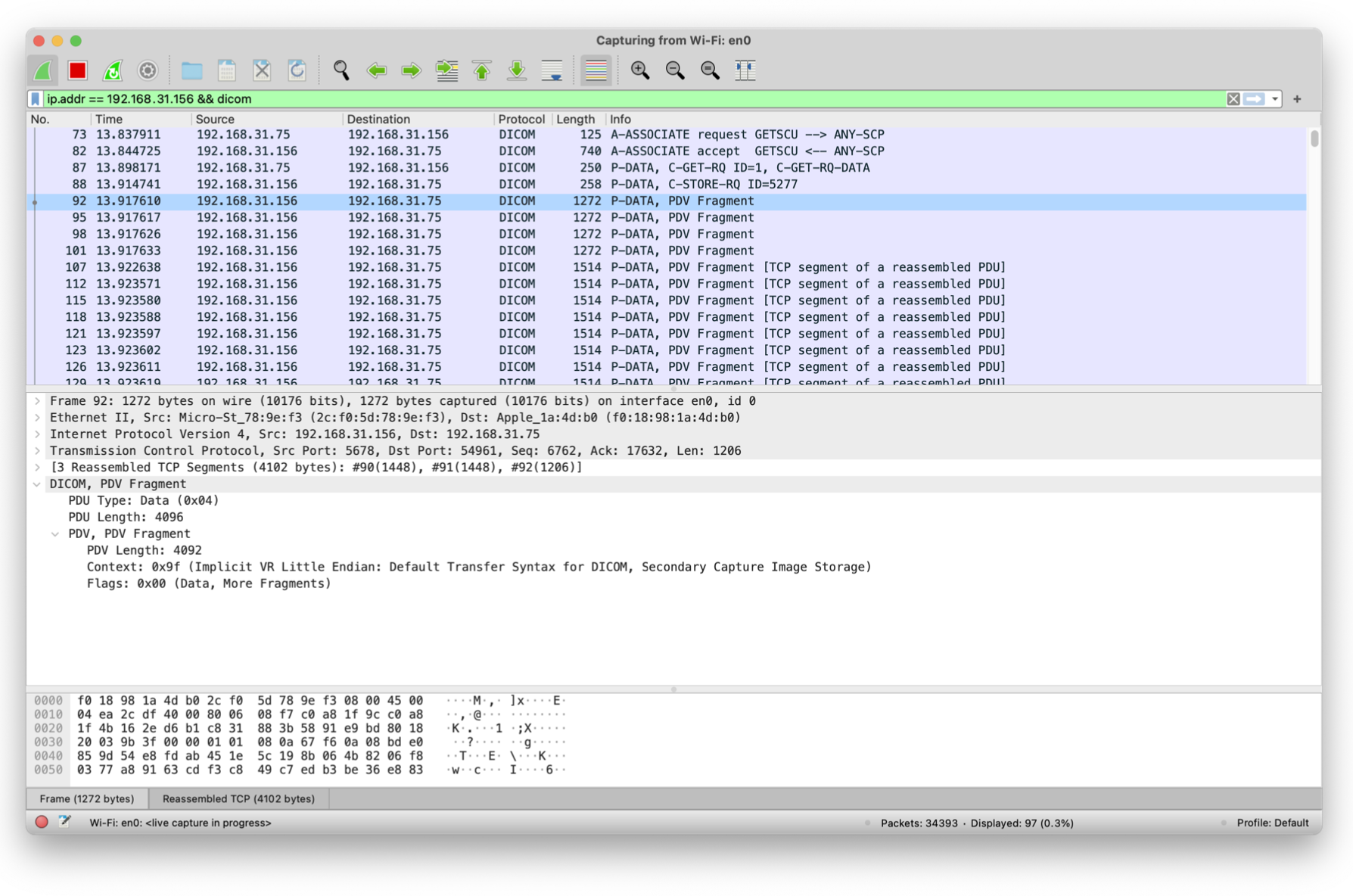
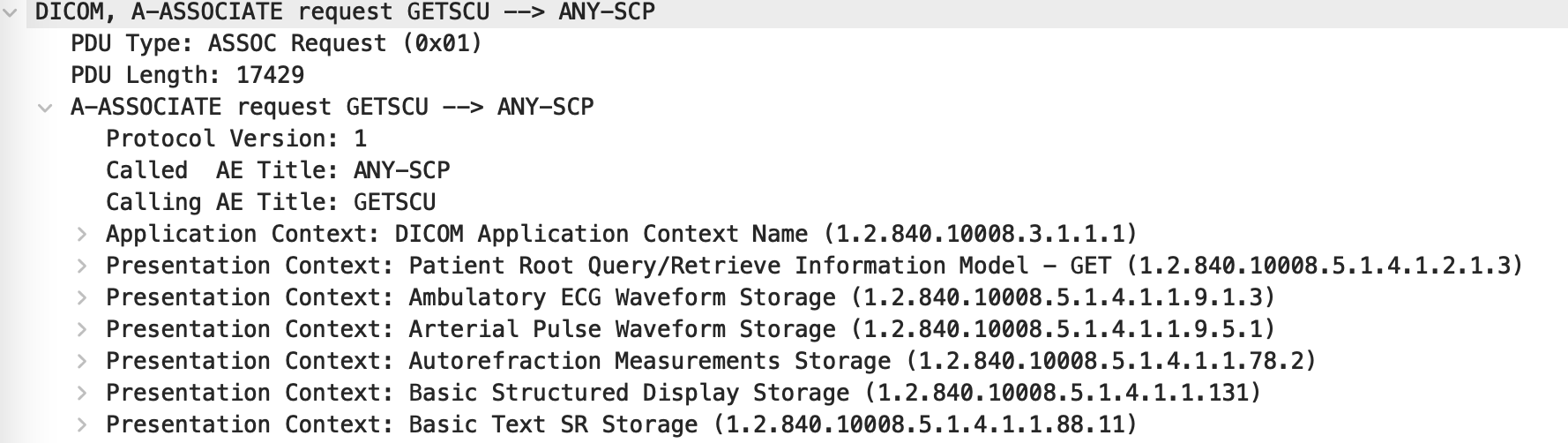
The process of C-GET is simpler than C-MOVE. It sends all Presentation Contexts like C-STORE when establishing a connection.
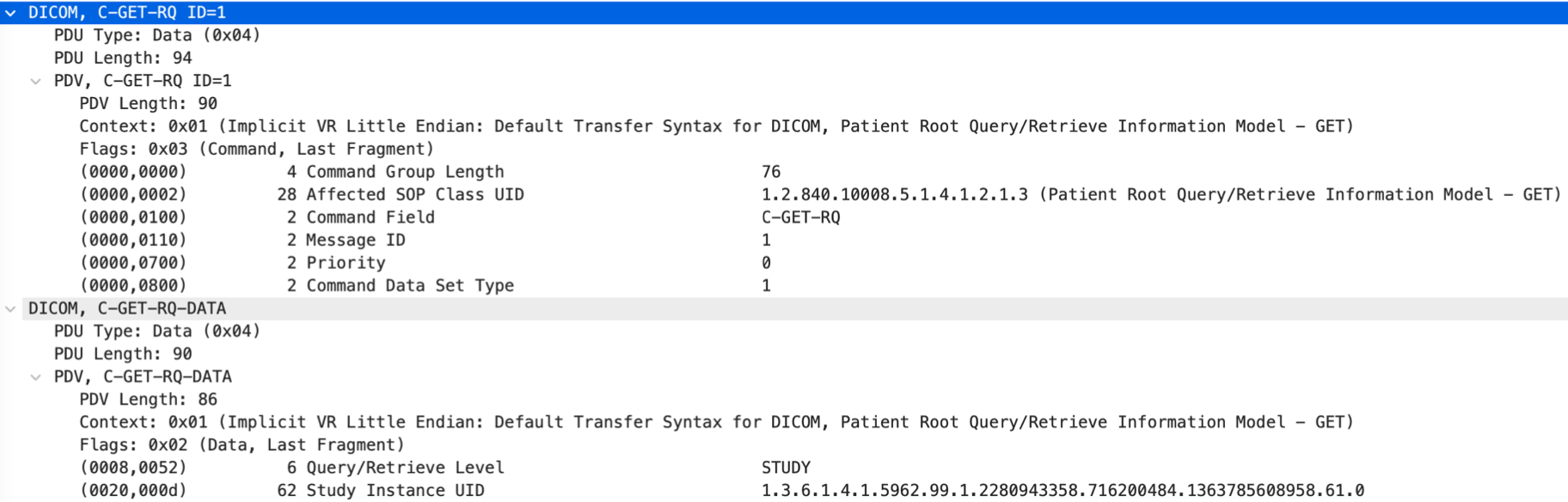
The following is the message content of C-GET, which is similar to the structure of C-FIND:
After sending the C-GET message, the other party will send a C-STORE message to start the transmission.
three. Results and discussion
In this project, based on the DICOM standard, I have completed a mini-PACS system that meets 11 protocols of the DICOM standard by selecting the open source DCMTK toolkit that implements the DICOM standard as Modality and View Station, and CONQUEST as the Server. In the process, through the analysis of the DICOM standard reading and the packet capture software, the structure of the DICOM image transmission protocol is understood, and the design of its TCP -> ULP -> PDU -> DATA is understood. Based on the above understanding, the detailed process of transmission can be clearly understood, that is, the connection is controlled through Associate PDU and Release PDU, and data is transmitted through P-DATA. The data contains messages that are strictly defined in the format of DICOM3.0, so that the relevant interfaces are implemented. The transmission function specified by DICOM can be realized between the client and the server.
This article uses CC BY-SA 4.0 License. You may need to give appropriate credit, provide a link to the license, and indicate if changes were made when referencing this article.